SpicyChat AI Character Creation: Complete Guide to Custom AI Companions
The difference between a SpicyChat AI character that stays in voice for fifty messages and one that drifts into generic AI-speak after five usually comes down to one thing: how well the character was built in the first place. I've created dozens of characters on the platform and tested what actually influences response consistency. This guide covers everything that matters — from the fields you fill out during creation to the lorebook system to personas and how to use them.
How Character Creation Works on SpicyChat AI
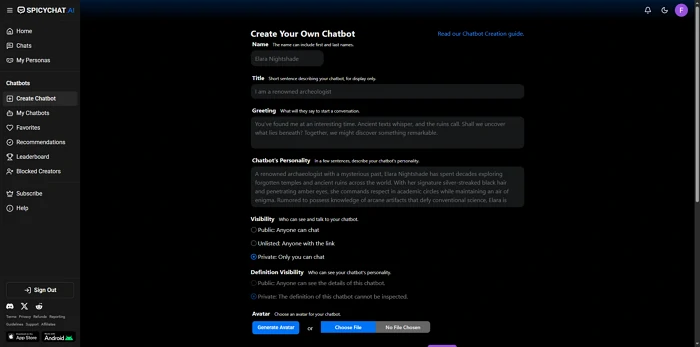
SpicyChat AI's character system sits on top of the SpicyXL large language model and the OpenAI API integration. When you send a message to a character, the AI combines your message with the character definition, lorebook entries (if active), conversation history (within the token limit), and any active persona to generate a response.
This means your character definition isn't just descriptive flavor — it's functional prompt engineering. Every field in the creation form contributes to the instruction context the AI uses to generate responses. Vague inputs produce generic outputs; specific, concrete inputs produce consistent character behavior.
Free vs premium character creation: You can create unlimited characters on both the free and paid tiers. The meaningful difference is in personas — how you appear to your characters. Free accounts get 3 persona slots; the top tier ($24.95/month) allows up to 50. The model quality also affects character consistency: the full SpicyXL experience at 141 billion parameters, available on the I'm All In tier, maintains character voice more reliably than the lighter free-tier model over long conversations.
Step-by-Step: Creating Your First Character
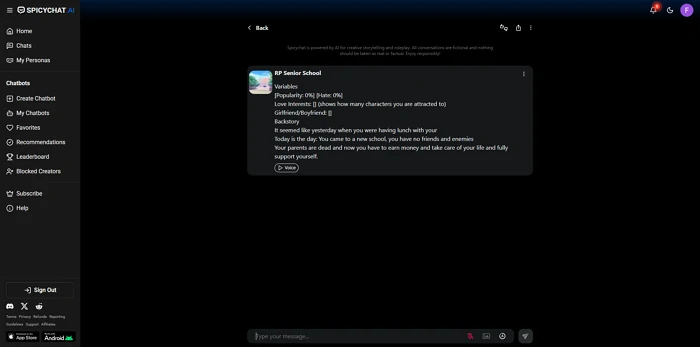
Navigate to "Create Character" from your dashboard. Here's what each field does and how to fill it well.
1. Name & Title
The character's name becomes part of every response prompt — the AI knows who it's supposed to be. Use whatever name fits the character's world. The title field is secondary display text that appears under the name in the character list; use it for role, rank, or a short descriptor ("Royal Librarian," "Outlaw Mechanic," "Rival Detective").
Keep names clear and pronounceable. If you're building a character with a complex backstory, the title field is a better place for nuance than the name itself.
2. Writing the Perfect Greeting
The greeting is the character's first message in every new conversation — the AI's opening line when a user starts a chat. This field has disproportionate influence on the character's voice, because it's the clearest demonstration of how the character talks and what the initial situation is.
A weak greeting: "Hello! I'm Elena. How can I help you today?"
A strong greeting: "You arrive at the tavern just before midnight. I look up from the letter I've been rereading for the third time — your contact didn't tell me you'd be this young. Pull up a chair before someone notices you've been standing in the doorway."
The second version establishes setting, tone, relationship context, and character voice in four sentences. It also gives the user something to respond to. Write your greeting as the character's actual first words, not as a summary of the character.
3. Personality Definition
This is the most critical field in the creation form. The personality description tells the AI how the character thinks, speaks, and behaves. The more concrete and specific you are, the more consistently the AI will produce on-brand responses.
What to include:
- Speaking style (formal/casual, verbose/terse, uses specific speech patterns)
- Emotional defaults (warm/cold, anxious/confident, direct/evasive)
- Values and worldview (what does the character care about?)
- Quirks and contradictions (what makes the character feel real rather than archetypal?)
- How the character relates to strangers vs people they trust
What to avoid:
- Generic descriptors ("kind, intelligent, mysterious") without behavioral context
- Contradictions that have no narrative grounding
- Lists of adjectives without examples of how those traits manifest in speech
A personality description of 150-300 words is a reasonable target. More detail gives the AI more to work with; less risks leaving too much undefined.
4. Scenario Context
The scenario tells the AI what situation the character and user are in when the conversation starts. Think of it as stage directions: where are they, what's the relationship, what's at stake?
Good scenario contexts answer:
- Where are we?
- Who is the user in this world?
- What's the nature of their relationship with the character?
- Is there an immediate situation or conflict?
The scenario doesn't need to be elaborate — a focused 50-100 word scenario often outperforms a rambling 500-word backstory. Specificity matters more than length.
5. Example Conversations
Example conversations are the fastest way to calibrate character voice. You write short exchanges — a user message and the character's response — that demonstrate how the character actually talks. The AI uses these as formatting and tone references.
Write 2-4 examples per character. Each example should show a different aspect of the character's voice: one emotional moment, one practical exchange, one situation where the character's personality is under pressure. Keep them realistic — overly theatrical examples can push the AI toward melodrama when the conversation doesn't warrant it.
6. Advanced Settings & Behavioral Hooks
Behavioral hooks are conditional instructions: specific triggers that cause specific responses. These are optional but powerful for characters with strong behavioral patterns.
Examples:
- "When the user expresses vulnerability, [character name] becomes more careful and attentive, lowers her guard slightly, speaks more quietly"
- "If the user uses [character name]'s real name in conversation, she freezes briefly before responding — she doesn't know how they found it out"
- "When asked about her past, [character name] deflects with humor before gradually revealing more if pressed gently"
Behavioral hooks work best when they describe behavioral patterns, not just personality traits. The AI responds better to "when X happens, the character does Y" than to "the character is Y."
Ready to explore? SpicyChat AI offers free access to 138K+ characters.
Start Chatting Free →Using Lorebooks for Worldbuilding
Lorebooks are structured reference documents attached to your character. They contain named entries — people, places, objects, events, rules of the world — that get injected into the AI's context when specific trigger keywords appear in conversation.
Why this matters: The AI has limited context memory (4K-16K tokens depending on your tier). Lorebooks let you store world information that activates on demand rather than taking up permanent context space. This means complex world details only load when relevant, keeping the active context focused.
Creating lorebook entries:
Each entry has three components:
- Entry name: The thing you're defining (a location, character, event, concept)
- Entry content: The information about it — write this as something the AI can directly use in response
- Trigger keywords: The specific words or phrases that cause this entry to activate
Example entry:
- Name: "The Varnholdt Accord"
- Trigger keywords: "Accord, treaty, Varnholdt, the agreement"
- Content: "The Varnholdt Accord was signed twelve years ago, ending the Border Wars. It established the neutral city of Brecht as a free trade zone and gave House Maren control of the eastern ports. Most nobles see it as a compromise; Lady Eris views it as a betrayal by her father."
When a conversation mentions "the Accord" or "Varnholdt," this entry automatically enters the active context.
Best practices:
- Keep entry content concise — 50-150 words per entry is enough for most world details
- Use specific trigger keywords rather than common words that might activate unintentionally
- Group related entries logically — don't create 40 granular entries when 10 comprehensive ones would cover the same ground
- Test triggers in conversation to verify they activate when expected
User Personas — Playing Different Roles
Personas are how you define yourself in conversation — your character's counterpart from the user's side. A persona sets a name, description, and any relevant relationship context for how the AI should understand who it's talking to.
Free accounts get 3 persona slots. The True Supporter tier ($14.95/month) allows 50 personas.
Practical uses for multiple personas:
- Play different characters across different story universes
- Use a named persona for ongoing narratives vs an anonymous persona for casual exploration
- Set different relationship contexts with the same character (ally vs rival vs stranger)
- Creative writing scenarios where you're playing a specific role in a story
Switching personas between sessions lets you explore the same character from different angles without resetting your relationship history — within the limits of what the context window remembers.
Tips for Better AI Responses
Work within token limits, not against them. The 4K token free context window holds roughly 3,000 words of conversation. If you're running long sessions, key relationship details established early will eventually fall outside the active window. For long-running narratives, periodically summarize key established facts as an in-character note ("To recap where we are: [details]") to keep them in active context.
Handle OOC issues directly. OOC (out-of-character) moments happen when the AI breaks from the character voice to say something generic or to qualify its response in a way a real character wouldn't. When this happens, the most effective response is to explicitly redirect: "Stay in character. [Character name] would say..." followed by a rephrasing of what you were asking.
Prompt engineering applies. Responses improve when your inputs are similarly detailed. Vague messages get vague responses. Specific, descriptively rich inputs tend to produce richer outputs. If the AI is producing short responses when you want longer ones, try prompting with longer, more detailed messages yourself — the AI often matches the register of the input.
Use the free tier for prototyping. Build and test characters on the free tier before investing significant creative time. The free model's limitations will show up in longer sessions, but for initial character testing and greeting calibration, free is entirely adequate.
For practical character inspiration and the types of scenarios the community has built, browsing the existing 138,000+ character library is one of the best research tools available.
Ready to explore? SpicyChat AI offers free access to 138K+ characters.
Start Chatting Free →Best SpicyChat AI Characters to Try
The existing character library covers a massive range. Some categories that consistently produce quality experiences:
Romance and companion characters: These are the most polished in the community library — creators have spent the most time refining greeting messages and personality definitions for romantic roleplay scenarios.
Fantasy archetypes: Mages, knights, royalty, rogues — classic high fantasy characters where the scenario context and personality fields have been carefully developed by experienced creators.
Genre fiction: Historical characters, sci-fi crew members, horror scenarios — the community has built detailed characters across most genre fiction contexts.
Original characters with detailed lorebooks: The most immersive experiences in the library tend to be characters with associated lorebooks that establish rich world contexts.
Our full platform review covers more on what distinguishes SpicyChat's character creation system from competitors like Character.AI and CrushOn AI.
FAQ
Unlimited character creation is available on both free and paid tiers. There's no cap on how many characters you can build. The limitation that's tier-gated is personas (how you appear to characters) — 3 on free, up to 50 on the top paid tier.
Yes — SpicyChat characters can be published publicly, making them discoverable to other users in the platform's character library. You can also keep characters private for your own use. Public characters become part of the community library; you retain authorship credit but the character is available to any user who finds it.
Memory in SpicyChat AI is primarily context-window-based — the AI remembers what fits within the active token limit of your current session (4K free, 8K mid, 16K top tier). Semantic Memory 2.0 (available from True Supporter tier upward) extends this with cross-session recall for key details. For important world facts you want consistently available, the best solution is lorebook entries with appropriate trigger keywords — these inject information reliably rather than depending on it remaining within the conversation window.
OOC stands for "out of character" — moments when the AI breaks from the character's voice and responds in a generic, non-character way. Common triggers include questions the AI decides require a disclaimer, content near the platform's content boundaries, or vague prompts that don't give the AI enough character context to stay on-brand. Handle OOC moments by explicitly redirecting: "Ignore the previous response and stay in character as [name]." Adding more specific context about how the character would actually respond to the situation also helps the AI stay anchored. If OOC happens persistently with a specific type of content, that content may be near a platform filter boundary.